Pre-launch page. Example content is made up and marked. Screens and outputs are real, from Node 2.91.120 on a test install with test links. The waitlist sends and stores nothing.
Change an affiliate link once. Every post follows.
Gillish Node is a WordPress plugin. It gives each affiliate link a short address on your own site, so a new destination reaches every post at the next click.
yoursite.com/node/rain-shell Changed once. All three posts send readers to the new page.
Links change. Your old posts don’t.
A product page moves, an offer ends, or a programme sends you a new link. The old address sits in every post that mentions the product, and a click on a dead address earns nothing.
Fixing it by hand
- Find every post with the old address.
- Open each one.
- Replace the address.
- Check that the label is still right.
- Save, and open the next post.
- Hope you found them all.
How short links work.
Add the affiliate link to Node.
Give it a name and a short address, such as yoursite.com/node/headlamp.
Place it in a post.
Select text in the block editor, press the Node button, and choose how to place it.
A reader clicks.
Node looks up the destination you set and sends the reader on.
Change the address once.
The next click in every post goes to the new address.
See it work.
One change. The next click follows.
The same short link, asked for twice: before and after its destination was changed once in Node. Nothing in the posts was touched.
And readers who clicked before?
Both answers tell the browser not to remember the route, so returning readers follow too.
www.example-shop.com/burr-grinder?tag=yoursite-20www.other-shop.example/burr-grinder?ref=yoursiteYour short link, ready to share.
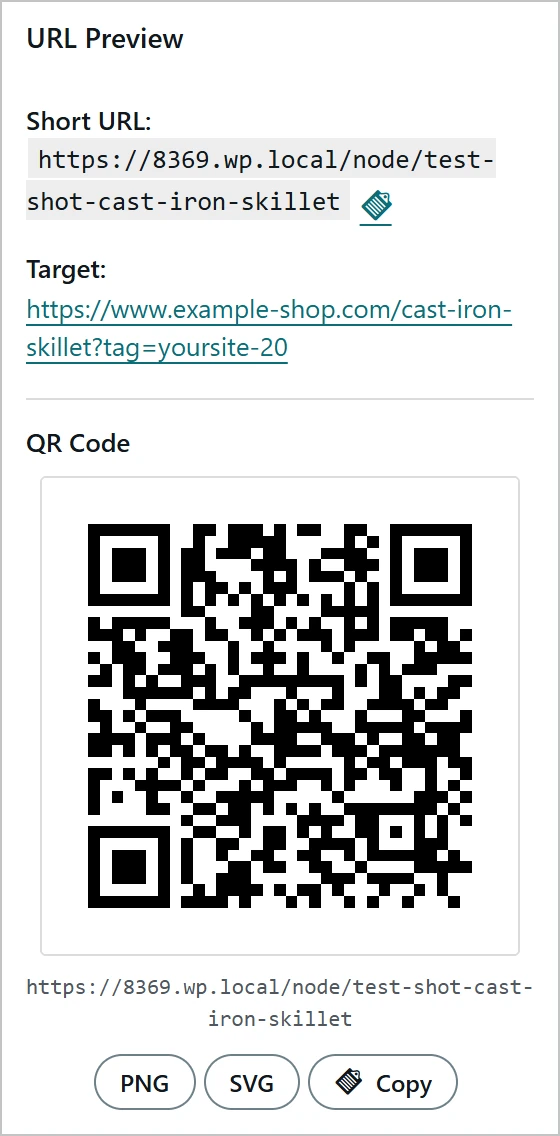
The link editor shows the short address, where it leads, and a QR code you can save as PNG or SVG, or copy.
Three ways to place a link.
However you place it, a new destination reaches the link at its next click. The way you place it decides whether it also follows your label settings.
The label Google wants, from one setting.
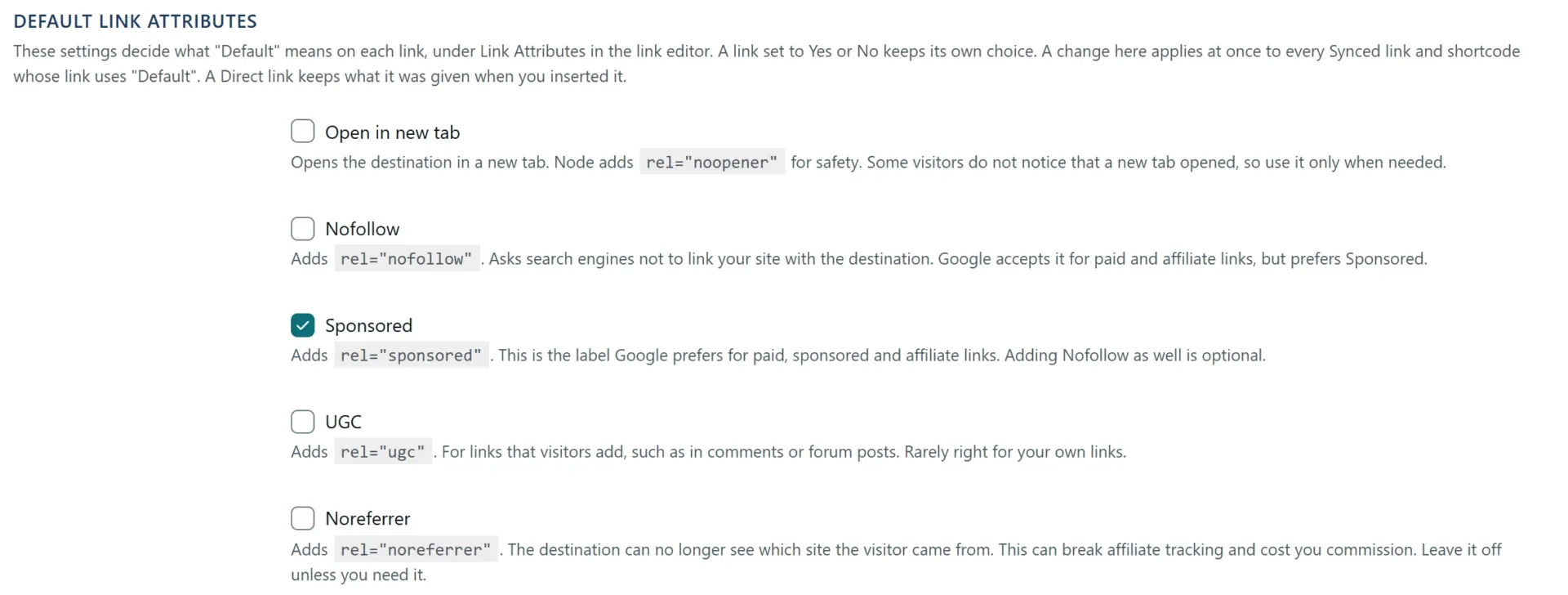
Tick Sponsored once in your settings, and every Synced, Shortcode and automatic link left on Default carries it, old posts included. A link set to Yes or No keeps its own choice.
Nofollow and ugc work the same way.
Will my internal links get the label too?
Only those left on Default. Set a link to No, and it stays without the label.
<a href="…/node/test-shot-burr-grinder/…">burr grinder</a>
<a href="…/node/test-shot-burr-grinder/…" rel="sponsored">burr grinder</a>
Node’s real output, shortened. Nothing in the post was changed.
Built for links that change.
Returning readers follow too.
Browsers are told not to remember the old route, so a reader who clicked before goes to the new address as well.
Use it beyond your posts.
Copy the short link for a newsletter or a video, or print its QR code. The code is drawn on your own site, with no outside service.
Start, end or cap a link.
Give a link a start date, an end date, or a number of clicks after which it stops. Automatic links keep to those limits too.
Questions about short links
Does every post follow a new destination?
Yes. Node reads the destination at each click, so every placement goes to the new one: Synced, Shortcode and Direct.
What about readers who clicked before?
They follow too. Browsers are told not to remember the old route.
Can I rename the short address?
You can. Shortcodes keep working, because they point to the link itself.
Does it hide where the link goes?
Your posts show your own short address. When a reader clicks, the browser goes on to the real destination.
What if I stop using Node?
When you deactivate Node, it offers to turn the links in your posts into plain links straight to their destinations, so your posts keep working.
Which links need a label?
That is your call. Node puts the label you choose on every link that follows the default.
Works with the rest of Node.
Make your links work harder.
Join the waitlist today. You are first in line when Gillish Node opens.
Every plan comes with a 14-day money-back guarantee.
Not on sale yet. No payment now. We write once, when Node opens.
Placeholder: this form sends nothing